
1. Haar Cascade 얼굴 검출
OpenCV에서 제공하는 Haar Cascade 기반의 얼굴 검출 모델 파일. 정면을 향한 사람의 얼굴을 인식하기 위해 훈련된 모델임.
Haar Cascade 기반 이란? 객체(예: 얼굴, 눈, 자동차 번호판 등)를 빠르게 감지하는 전통적인 기계 학습 기반 방법.
참고 깃허브 링크: https://github.com/opencv/opencv/tree/master/data/haarcascades
opencv/data/haarcascades at master · opencv/opencv
Open Source Computer Vision Library. Contribute to opencv/opencv development by creating an account on GitHub.
github.com

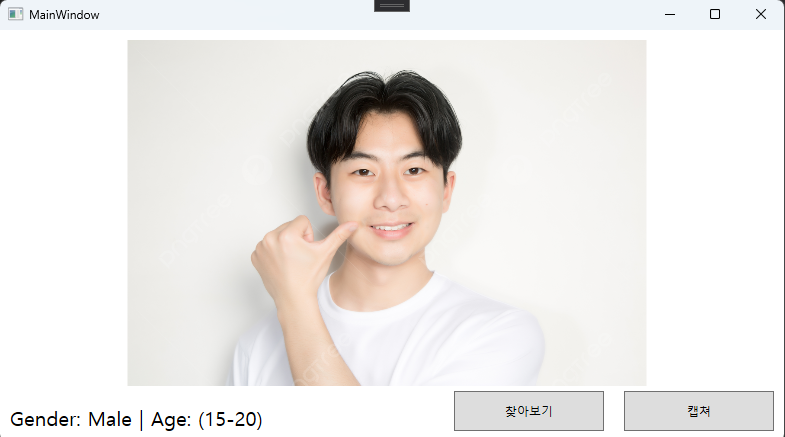
찾아보기 버튼(파일 내의 이미지 파일 선택) 과 카메라 캡쳐 버튼(연결된 캠으로 카메라연동)구성. 저작권 없는 사람 이미지를 사용하였다.

"(0-2)", "(4-6)", "(8-12)", "(15-20)", "(25-32)", "(38-43)", "(48-53)", "(60-100)" 으로 연령대를 예측하게 구성하였다. 여러 이미지로 테스트 해본 결과 동양인은 인식률이 떨어지는 것 같다.
Haar Cascade 얼굴 검출
haarcascade_frontalface_default.xml
나이
deploy_age.prototxt
age_net.caffemodel
성별
deploy_gender.prototxt
gender_net.caffemodel
2. DNN 기반 SSD 얼굴 검출
res10_300x300_ssd_iter_140000.caffemodel (Caffe 기반 SSD 모델) 사용. 딥러닝 모델.
위 방식과 같이 age_net.caffemodel 모델 사용. 성별,나이 예측모델은 위와 동일.
face-detection-with-OpenCV-and-DNN/res10_300x300_ssd_iter_140000.caffemodel at master · sr6033/face-detection-with-OpenCV-and-D
Detecting faces using OpenCV's Deep Neural Network - sr6033/face-detection-with-OpenCV-and-DNN
github.com
3. face-detection-retail-0004 와 age-gender-recognition-retail-0013
face-detection-retail-0004 얼굴검출.
age-gender-recognition-retail-0013 (OpenVINO 모델) 나이성별예측. 인텔 OpenVINO Toolkit 에서 제공하는 사전 학습된 모델 중 하나로, 얼굴 이미지로부터 나이와 성별을 추론. 딥러닝 모델.
18 - 75 세 범위에 있는 사람들의 나이를 인식하도록 훈련되었음.
하면서 제일 헤맸다. 인식률은 이 중에선 그나마 제일 높은 듯.
실제 카메라를 이용해(캡쳐버튼) 동일한 사용자의 얼굴을 여러 차례 인식한 결과, 일관되고 안정적인 결과 값을 보여줌. 여러 번 인식하더라도 결과가 크게 달라지지 않고 유사한 값을 지속적으로 산출.
반면 앞서 사용했던 두 모델은 동일한 얼굴을 인식할 때 조명 변화나 얼굴 움직임에 결과 값이 크게 변동하는 경향이 있었다.
파이썬 가상환경 만들기 + face-detection-retail-0004 와 age-gender-recognition-retail-0013 모델 다운로드
cmd 에서
pip install openvino-dev[onnx]일단 OpenVINO 을 설치한다.
omz_downloader --name face-detection-retail-0004
omz_downloader --name age-gender-recognition-retail-0013
face-detection-retail-0004 와 age-gender-recognition-retail-0013 모델 다운로드
C:\Users\사용자\intel 가보면 두 폴더가 생긴걸 확인할 수 있다.각 폴더 내의 FP16 폴더로 들어감. 원하는 곳으로 복사.
python -m venv venv
venv\Scripts\activate
pip install openvino-dev opencv-python pywin32
가상환경 생성 및 활성화
참고 깃허브링크
open_model_zoo/models/intel/age-gender-recognition-retail-0013/README.md at master · openvinotoolkit/open_model_zoo
Pre-trained Deep Learning models and demos (high quality and extremely fast) - openvinotoolkit/open_model_zoo
github.com
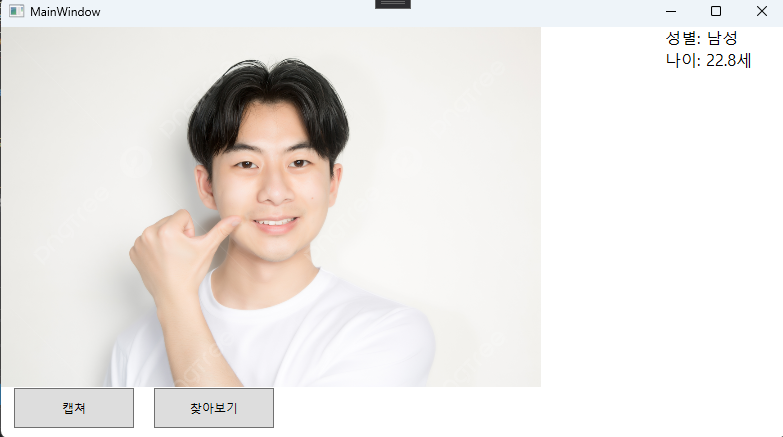
Python + OpenVINO로 얼굴, 나이, 성별 인식 → WPF로 결과 표시
파이썬과 연동시켰다.
import os
import sys
import json
import cv2
import numpy as np
from openvino.runtime import Core, Tensor

def imread_unicode(path):
    try:
        stream = np.fromfile(path, dtype=np.uint8)
        return cv2.imdecode(stream, cv2.IMREAD_COLOR)
    except Exception as e:
        print(f"[ERROR] imread_unicode 실패: {e}")
        return None

def load_model(core, model_path):
    model = core.read_model(model_path)
    compiled_model = core.compile_model(model, "CPU")
    return compiled_model

def preprocess_for_face_detection(image):
    resized = cv2.resize(image, (300, 300))
    blob = cv2.dnn.blobFromImage(resized, 1.0, (300, 300), (0, 0, 0), swapRB=False, crop=False)
    return blob

def preprocess_for_age_gender(face):
    resized = cv2.resize(face, (62, 62))
    blob = cv2.dnn.blobFromImage(resized, 1.0, (62, 62), (0, 0, 0), swapRB=False, crop=False)
    return blob

def main(image_path, output_path):
    core = Core()

    face_model = load_model(core, r"Model/intel/face-detection-retail-0004/FP16/face-detection-retail-0004.xml")
    age_gender_model = load_model(core, r"Model/intel/age-gender-recognition-retail-0013/FP16/age-gender-recognition-retail-0013.xml")

    image = imread_unicode(image_path)
    if image is None:
        print(f"[ERROR] 이미지 불러오기 실패: {image_path}")
        sys.exit(1)

    input_blob = preprocess_for_face_detection(image)
    infer_request = face_model.create_infer_request()
    input_tensor = Tensor(input_blob)
    infer_request.set_input_tensor(input_tensor)
    infer_request.infer()

    output = infer_request.get_output_tensor().data
    face_found = False
    h, w = image.shape[:2]

    for detection in output[0][0]:
        confidence = float(detection[2])
        if confidence > 0.5:
            xmin = int(detection[3] * w)
            ymin = int(detection[4] * h)
            xmax = int(detection[5] * w)
            ymax = int(detection[6] * h)

            xmin = max(0, xmin)
            ymin = max(0, ymin)
            xmax = min(w, xmax)
            ymax = min(h, ymax)

            face = image[ymin:ymax, xmin:xmax]
            face_found = True
            break

    if not face_found:
        result = {"error": "얼굴이 감지되지 않았습니다."}
        with open(output_path, "w", encoding="utf-8") as f:
            json.dump(result, f, ensure_ascii=False)
        return

    face_blob = preprocess_for_age_gender(face).astype(np.float32)
    face_tensor = Tensor(face_blob)

    infer_request = age_gender_model.create_infer_request()
    infer_request.set_input_tensor(0, face_tensor)
    infer_request.infer()

    gender_raw = infer_request.get_output_tensor(0).data
    age_raw = infer_request.get_output_tensor(1).data

    gender_probs = gender_raw.squeeze()
    age = float(age_raw.squeeze()) * 100

    if len(gender_probs) == 2:
        gender = "여성" if gender_probs[0] > gender_probs[1] else "남성"
    else:
        gender = "알 수 없음"

    result = {
        "Gender": gender,
        "Age": round(age, 1)
    }

    with open(output_path, "w", encoding="utf-8") as f:
        json.dump(result, f, ensure_ascii=False)

    print("[INFO] 추론 결과 저장 완료:", output_path)

if __name__ == "__main__":
    if len(sys.argv) != 3:
        print("사용법: python inference.py <image_path> <output_json_path>")
        sys.exit(1)

    image_path = sys.argv[1]
    output_path = sys.argv[2]

    print(f"[DEBUG] 입력 이미지 경로: {image_path}")
    print(f"[DEBUG] 출력 JSON 경로: {output_path}")

    main(image_path, output_path)